Blog Archive

Showing posts with label tulip. Show all posts

Tulip Refresher Course

I know that some of you guys/gals are more the follow the course tape type of people, so this "race" will be a change. The course will be given to you in two halves. You'll get tulip notes at raceday sign-in for the first half of the race. Once you get to the Zumbro Falls checkpoint you'll receive the instructions for the second half of the race. Approximate size of the notes will be 4.25" x 5.5" (maybe a bit smaller).

Each instruction will include an instruction number, an overall mileage, a tulip diagram and an information cell. The overall mileage will count up from the start or any place where you are instructed to reset your mileage, such as a checkpoint.

The tulip diagram is a graphical representation of the location for the instruction. Normally this is an intersection of two or more roads, or a feature of a road. The tulip always has two features, the dot and the arrow. No matter how the tulip is oriented, you always will travel from the dot to the arrow for that instruction. Normally the tulips are drawn so you are traveling from the bottom of the tulip, but this doesn't have to be the case.

Here is a sample note:
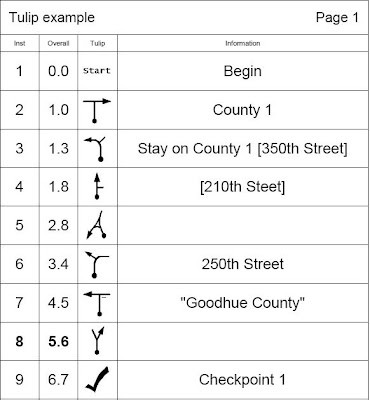


The first tulip of instruction 1 ("Begin") shows that the mileage is zero, so you would want to zero your odometer at that instruction.

The 2nd shows that you will approach a T intersection (in this case it's County road 1) and take a right. This intersection is aproximately 1.0 miles from the last zero.

The third instruction shows that the road turns left, with another road branching off on the right. When a road is in brackets, ex. [350th street], it is indicating the intersecting or connecting road, but NOT the road you take. So in our example above, we stay on County 1 which bends to the left and 350th street intersects from the right.

Instruction 4 is similar. Since 210th street is in brackets [], it indicates the intersecting road is 210th street, but the tulip shows we keep going straight.
!! When in doubt, always follow the tulip and ignore the street or road names provided.

Instruction 5 shows a more complex intersection that we approach from the bottom right and end up taking a hard left a the delta.

Instuction 6 shows that the road we are on bends right, but we take 250th Street that intersects from the left.

When information is in quotes and a small dash is shown on the tulip, as shown in instruction 7, it indicates the text that is on a sign. That sign will be where the dash is shown at the intersection.

Instruction 8 simply shows that we take a right at a Y intersection and that intersection is at approximately 5.6 miles from the last odometer zero.

Tulip 9 shows the location of a checkpoint.

In summary, the text is normally there to provide or clarify the instruction, but the primary thing you should focus on is the tulip. 
Always travel from dot to arrow, no matter how the tulip is oriented on the page.


Taken from http://ragnarok105.blogspot.com/

Cue sheets 101


Our route instructions are listed in a 4 column format. Each instruction will include an instruction number, a mileage, a 'tulip' diagram and information. The mileage will count up from the start or any place where you are instructed to reset your mileage, such as a checkpoint.


The tulip diagram is a graphical representation of the feature for the instruction. Normally this is an intersection of two or more roads, or a feature of a road. The tulip has two features. The dot and the arrow. No matter how the tulip is shown, you will travel through the intersection from the dot to the arrow. Normally the tulips are drawn so you are traveling from the bottom of the tulip, but this doesn't have to be the case. Note: all mileages are rounded to the nearest tenth of a mile. Example:


Instruction 1 is at mile 27.2. The diagram indicates caution is required at that location and the info describes why.

Instruction 2 is at mile 27.3 and it indicates that you are to take a right at a 4 way intersection and end up on Water street.

Instruction 3 shows a more complicated intersection where 3 roads meet. Here you would take the 90 degree right onto 355th street.

Instruction 4 indicates you should continue straight past an intersection with 200th street. When a name is in square brackets, it indicates the crossing street or road.

Instruction 5 shows one of the "King of the Mountain" locations. We will score the first several riders to this location for that competition. For the following riders, this location doesn't mean much, other than the top of a hill.

Instruction 6 shows that the primary road curves left, but you will take the secondary road to the right. In this case, the secondary road is 380th street.

Instruction 7 shows a turn onto a Minimum Maintenance road. The dashed line indicates the road is a less prominent road than a regular road.

Instruction 8 shows a checkpoint. At each checkpoint, make sure the person working that location has your number before you leave. You may also need to get a new set of cue notes at that location.

In summary, the text is normally there to provide or clarify the instruction, but the primary thing you should focus on is the tulip. Always travel from dot to arrow, no matter how the tulip is oriented on the page.


Taken from http://ragnarok105.blogspot.com/

Tulip note reading 101


The dot on the tulip note is you, moving forward...

The arrow is the direction you go. If it's a left turn, the arrow points to the left. Etc.

Each tulip is drawn to replicate (or at least generally replicate) the intersection that you are going through. Follow the arrow!

When there is a note in [brackets] that is the road that you are crossing/passing/NOT going on. So for example this year at mile 11.7 you will take a right. The information/note says "stay on old Church road [Hill Valley road]". That means that you take a right while staying on Old Church road and the intersecting road, that you don't ride onto at this point, is Hill Valley.

We have noted the KOM locations in the first half of the race. These distances are approximate. We will try to match up where we are parked as close as possible, but it won't be perfect. We will make all attempts reasonable to make the KOM point clear. Most likely unless otherwise noted assume it's the back of the vehicle.

Thanks for reading... only a few more days!!!!


Taken from http://ragnarok105.blogspot.com/

Tulip Notes 101


Each instruction will include an instruction number, an overall mileage, a tulip diagram and an information cell. The overall mileage will count up from the start or any place where you are instructed to reset your mileage, such as a checkpoint.

The tulip diagram is a graphical representation of the location for the instruction. Normally this is an intersection of two or more roads, or a feature of a road. The tulip always has two features, the dot and the arrow. No matter how the tulip is oriented, you always will travel from the dot to the arrow for that instruction. Normally the tulips are drawn so you are traveling from the bottom of the tulip, but this doesn't have to be the case.

Here is a sample note:


The first tulip of instruction 1 ("Begin") shows that the mileage is zero, so you would want to zero your odometer at that instruction.

The 2nd shows that you will approach a T intersection (in this case it's County road 1) and take a right. This intersection is aproximately 1.0 miles from the last zero.

The third instruction shows that the road turns left, with another road branching off on the right. When a road is in brackets, ex. [350th street], it is indicating the intersecting or connecting road, but NOT the road you take. So in our example above, we stay on County 1 which bends to the left and 350th street intersects from the right.

Instruction 4 is similar. Since 210th street is in brackets [], it indicates the intersecting road is 210th street, but the tulip shows we keep going straight.
!! When in doubt, always follow the tulip and ignore the street or road names provided.

Instruction 5 shows a more complex intersection that we approach from the bottom right and end up taking a hard left a the delta.

Instuction 6 shows that the road we are on bends right, but we take 250th Street that intersects from the left.

When information is in quotes and a small dash is shown on the tulip, as shown in instruction 7, it indicates the text that is on a sign. That sign will be where the dash is shown at the intersection.

Instruction 8 simply shows that we take a right at a Y intersection and that intersection is at approximately 5.6 miles from the last odometer zero.

Tulip 9 shows the location of a checkpoint.

In summary, the text is normally there to provide or clarify the instruction, but the primary thing you should focus on is the tulip.
Always travel from dot to arrow, no matter how the tulip is oriented on the page.


Taken from http://ragnarok105.blogspot.com/